
It is going to bomb!! It is going to bomb!!
Pre-require
- Shutdown the vm
- There is no snapshot for the vm or consolidation snapshots first, or the vm can not be started again
- The datastore has enougth capacity for your extend
Note: This Kb my be can help youm if you run vmkfstools before consolidation snapshots
Extend the disk using vmkfstools
Open the ssh on Esx
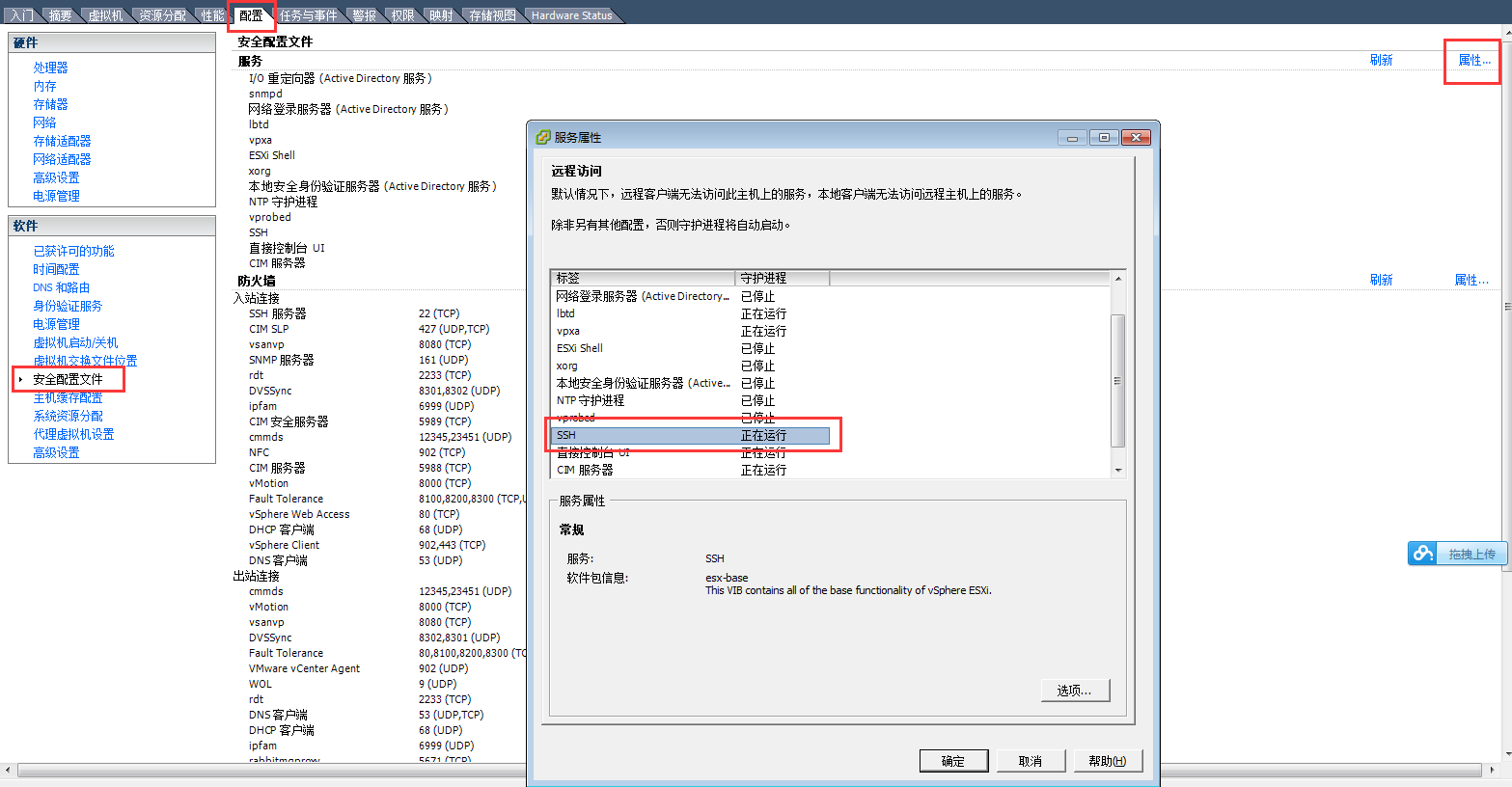
Extend the disk12
- Go into the directory of the VM
-
Extend the vmdk
 # ssh root@xxx.xxx.xxx.xxx
 # cd /vmfs/volumes/datastore1 (2)/RZ
 # vmkfstools -X 50G -d eagerzeroedthick RZ_2.vmdk


 /vmfs/volumes/54b0d7db-3de49c7a-281d-00e0ed1fd390/RZ # ls -lh
 total 10128392
 -rw-------    1 root     root        8.5K Sep 12  2015 RZ.nvram
 -rw-r--r--    1 root     root           0 Aug 12  2015 RZ.vmsd
 -rwxr-xr-x    1 root     root        3.1K Sep 12  2015 RZ.vmx
 -rw-r--r--    1 root     root         257 Aug 12  2015 RZ.vmxf
 -rw-------    1 root     root       16.0G Sep 12  2015 RZ_2-flat.vmdk
 -rw-------    1 root     root         517 Aug 12  2015 RZ_2.vmdk
 -rw-r--r--    1 root     root      127.9K Sep 12  2015 vmware.log
 /vmfs/volumes/54b0d7db-3de49c7a-281d-00e0ed1fd390/RZ # vmkfstools -X 30G RZ_2.vmdk
 Grow: 100% done.
 /vmfs/volumes/54b0d7db-3de49c7a-281d-00e0ed1fd390/RZ # ls -lh
 total 10128392
 -rw-------    1 root     root        8.5K Sep 12  2015 RZ.nvram
 -rw-r--r--    1 root     root           0 Aug 12  2015 RZ.vmsd
 -rwxr-xr-x    1 root     root        3.1K Sep 12  2015 RZ.vmx
 -rw-r--r--    1 root     root         257 Aug 12  2015 RZ.vmxf
 -rw-------    1 root     root       30.0G Sep 12  2015 RZ_2-flat.vmdk
 -rw-------    1 root     root         517 Jun  6 12:21 RZ_2.vmdk
 -rw-r--r--    1 root     root      127.9K Sep 12  2015 vmware.log
Extend on the volume
Check the information about the file system
[root@localhost ~]# df -h
Filesystem            Size  Used Avail Use% Mounted on
/dev/mapper/VolGroup-lv_root
                       14G  6.7G  6.2G  52% /
tmpfs                 499M   76K  499M   1% /dev/shm
/dev/sda1             477M   52M  400M  12% /boot
Extend volume
List partition table
[root@localhost ~]# fdisk -l

Disk /dev/sda: 32.2 GB, 32212254720 bytes
255 heads, 63 sectors/track, 3916 cylinders
Units = cylinders of 16065 * 512 = 8225280 bytes
Sector size (logical/physical): 512 bytes / 512 bytes
I/O size (minimum/optimal): 512 bytes / 512 bytes
Disk identifier: 0x000916c6

   Device Boot      Start         End      Blocks   Id  System
/dev/sda1   *           1          64      512000   83  Linux
Partition 1 does not end on cylinder boundary.
/dev/sda2              64        2089    16264192   8e  Linux LVM

Disk /dev/mapper/VolGroup-lv_root: 14.9 GB, 14935916544 bytes
255 heads, 63 sectors/track, 1815 cylinders
Units = cylinders of 16065 * 512 = 8225280 bytes
Sector size (logical/physical): 512 bytes / 512 bytes
I/O size (minimum/optimal): 512 bytes / 512 bytes
Disk identifier: 0x00000000


Disk /dev/mapper/VolGroup-lv_swap: 1715 MB, 1715470336 bytes
255 heads, 63 sectors/track, 208 cylinders
Units = cylinders of 16065 * 512 = 8225280 bytes
Sector size (logical/physical): 512 bytes / 512 bytes
I/O size (minimum/optimal): 512 bytes / 512 bytes
Disk identifier: 0x00000000
Create partition
[root@localhost ~]# fdisk /dev/sda

WARNING: DOS-compatible mode is deprecated. It's strongly recommended to
		 switch off the mode (command 'c') and change display units to
		 sectors (command 'u').

Command (m for help): p

Disk /dev/sda: 32.2 GB, 32212254720 bytes
255 heads, 63 sectors/track, 3916 cylinders
Units = cylinders of 16065 * 512 = 8225280 bytes
Sector size (logical/physical): 512 bytes / 512 bytes
I/O size (minimum/optimal): 512 bytes / 512 bytes
Disk identifier: 0x000916c6

   Device Boot      Start         End      Blocks   Id  System
/dev/sda1   *           1          64      512000   83  Linux
Partition 1 does not end on cylinder boundary.
/dev/sda2              64        2089    16264192   8e  Linux LVM

Command (m for help): n
Command action
   e   extended
   p   primary partition (1-4)
p
Partition number (1-4): 3
First cylinder (2089-3916, default 2089):
Using default value 2089
Last cylinder, +cylinders or +size{K,M,G} (2089-3916, default 3916):
Using default value 3916

Command (m for help): p

Disk /dev/sda: 32.2 GB, 32212254720 bytes
255 heads, 63 sectors/track, 3916 cylinders
Units = cylinders of 16065 * 512 = 8225280 bytes
Sector size (logical/physical): 512 bytes / 512 bytes
I/O size (minimum/optimal): 512 bytes / 512 bytes
Disk identifier: 0x000916c6

Device Boot      Start         End      Blocks   Id  System
/dev/sda1   *           1          64      512000   83  Linux
Partition 1 does not end on cylinder boundary.
/dev/sda2              64        2089    16264192   8e  Linux LVM
/dev/sda3            2089        3916    14678054   83  Linux

Command (m for help): t
Partition number (1-4): 3
Hex code (type L to list codes): 8e
Changed system type of partition 3 to 8e (Linux LVM)

Command (m for help): w
The partition table has been altered!

Calling ioctl() to re-read partition table.

WARNING: Re-reading the partition table failed with error 16: Device or resource busy.
The kernel still uses the old table. The new table will be used at
the next reboot or after you run partprobe(8) or kpartx(8)
Syncing disks.
Reboot
List partition table
[root@localhost ~]# fdisk -l

Disk /dev/sda: 32.2 GB, 32212254720 bytes
255 heads, 63 sectors/track, 3916 cylinders
Units = cylinders of 16065 * 512 = 8225280 bytes
Sector size (logical/physical): 512 bytes / 512 bytes
I/O size (minimum/optimal): 512 bytes / 512 bytes
Disk identifier: 0x000916c6

   Device Boot      Start         End      Blocks   Id  System
/dev/sda1   *           1          64      512000   83  Linux
Partition 1 does not end on cylinder boundary.
/dev/sda2              64        2089    16264192   8e  Linux LVM
/dev/sda3            2089        3916    14678054   8e  Linux LVM

Disk /dev/mapper/VolGroup-lv_root: 14.9 GB, 14935916544 bytes
255 heads, 63 sectors/track, 1815 cylinders
Units = cylinders of 16065 * 512 = 8225280 bytes
Sector size (logical/physical): 512 bytes / 512 bytes
I/O size (minimum/optimal): 512 bytes / 512 bytes
Disk identifier: 0x00000000


Disk /dev/mapper/VolGroup-lv_swap: 1715 MB, 1715470336 bytes
255 heads, 63 sectors/track, 208 cylinders
Units = cylinders of 16065 * 512 = 8225280 bytes
Sector size (logical/physical): 512 bytes / 512 bytes
I/O size (minimum/optimal): 512 bytes / 512 bytes
Disk identifier: 0x00000000
Create physical volume(pv)
# pvcreate /dev/sda3
Physical volume "/dev/sda3" successfully created
Add it to volume group
[root@localhost ~]# lvm
lvm> vgdisplay
  --- Volume group ---
  VG Name               VolGroup
  System ID
  Format                lvm2
  Metadata Areas        1
  Metadata Sequence No  3
  VG Access             read/write
  VG Status             resizable
  MAX LV                0
  Cur LV                2
  Open LV               2
  Max PV                0
  Cur PV                1
  Act PV                1
  VG Size               15.51 GiB
  PE Size               4.00 MiB
  Total PE              3970
  Alloc PE / Size       3970 / 15.51 GiB
  Free  PE / Size       0 / 0
  VG UUID               Wr846w-15Jg-cpJL-sYec-JhQC-xiFc-piDpSb

lvm> vgextend /dev/VolGroup-lv_root /dev/sda3
  Volume group "VolGroup-lv_root" not found
lvm> vgextend /dev/mapper/VolGroup-lv_root /dev/sda3
  Volume group name "VolGroup/lv_root" has invalid characters.
lvm> vgextend /dev/VolGroup /dev/sda3
  Volume group "VolGroup" successfully extended
lvm> vgdisplay
  --- Volume group ---
  VG Name               VolGroup
  System ID
  Format                lvm2
  Metadata Areas        2
  Metadata Sequence No  4
  VG Access             read/write
  VG Status             resizable
  MAX LV                0
  Cur LV                2
  Open LV               2
  Max PV                0
  Cur PV                2
  Act PV                2
  VG Size               29.50 GiB
  PE Size               4.00 MiB
  Total PE              7553
  Alloc PE / Size       3970 / 15.51 GiB
  Free  PE / Size       3583 / 14.00 GiB
  VG UUID               Wr846w-15Jg-cpJL-sYec-JhQC-xiFc-piDpSb
Show the logic volume and extend lv
lvm> lvdisplay
  --- Logical volume ---
  LV Path                /dev/VolGroup/lv_root
  LV Name                lv_root
  VG Name                VolGroup
  LV UUID                MAF9YH-8itV-QQFf-DVYV-jxOT-rjVy-Fr2rH3
  LV Write Access        read/write
  LV Creation host, time localhost.localdomain, 2014-12-31 15:09:40 +0800
  LV Status              available
  # open                 1
  LV Size                13.91 GiB
  Current LE             3561
  Segments               1
  Allocation             inherit
  Read ahead sectors     auto
  - currently set to     256
  Block device           253:0

  --- Logical volume ---
  LV Path                /dev/VolGroup/lv_swap
  LV Name                lv_swap
  VG Name                VolGroup
  LV UUID                HzREt5-7uns-MKXO-abSD-BCxc-B97d-7bz1aT
  LV Write Access        read/write
  LV Creation host, time localhost.localdomain, 2014-12-31 15:09:46 +0800
  LV Status              available
  # open                 1
  LV Size                1.60 GiB
  Current LE             409
  Segments               1
  Allocation             inherit
  Read ahead sectors     auto
  - currently set to     256
  Block device           253:1

lvm> lvextend -L +14G  /dev/VolGroup/lv_root
  Insufficient free space: 3584 extents needed, but only 3583 available
lvm> lvextend -L +13.9G  /dev/VolGroup/lv_root
  Rounding size to boundary between physical extents: 13.90 GiB
  Size of logical volume VolGroup/lv_root changed from 13.91 GiB (3561 extents) to 27.81 GiB (7120 extents).
  Logical volume lv_root successfully resized
Fix the system config file
[root@localhost ~]# resize2fs -p /dev/VolGroup/lv_root
resize2fs 1.41.12 (17-May-2010)
Filesystem at /dev/VolGroup/lv_root is mounted on /; on-line resizing required
old desc_blocks = 1, new_desc_blocks = 2
Performing an on-line resize of /dev/VolGroup/lv_root to 7290880 (4k) blocks.
The filesystem on /dev/VolGroup/lv_root is now 7290880 blocks long.
It is done
[root@localhost ~]# df -h
Filesystem            Size  Used Avail Use% Mounted on
/dev/mapper/VolGroup-lv_root
					   28G  6.7G   20G  26% /
tmpfs                 499M   72K  499M   1% /dev/shm
/dev/sda1             477M   52M  400M  12% /boot
Add a new virture disk
refer this post